Releases - Sonic-Mania-Vita
Sonic Mania Vita 1.1 | Trophies for All!
Tag: 1.1 · 2023-09-05
Download: Game.suprx (1.8 MB)
Download: modconfig.ini (0.0 MB)
Download: Settings.ini (0.0 MB)
Download: SonicMania.vpk (2.0 MB)
IMPORTANT
Installation instructions in README
If you have already installed Sonic Mania 1.0.2, you do not need to update Game.suprx
Trophy Support
-
The game now features all of the achievements as unlockable trophies from the official game, with an added Platinum Trophy for those of you who want to go all out. All trophy ranks have been adjusted to reflect actual difficulty.
-
In order to use trophies, you will need to install the NpTrpDrm Plugin by Rinnegatamante.
Thanks to Rinnegatamante for the help with getting trophies implemented
Fixes for users using forcedIntegerScaling mode (Recommended)
I have ported the Ultrawide Mania mod that fixes various level bugs that occur when widening the screen. This also fixes the Press Garden boss from soft-locking the level. If you want that, check out the Mods releases: https://github.com/SonicMastr/RSDKv5-Example-Mods/releases
Known Issues:
- Special stages are still slow. Still too slow. Very, very, veryyyy slow.
- Not really an issue, but this won't be released with Plus support. This is intentional as an anti-piracy measure, as there is
no real way to check for ownership. The only way to obtain Plus support is by building this yourself.
There is a guide here
Sonic Mania Vita 1.0.2 | General Bug Fixes (Upstream gameplay fixes)
Tag: 1.0.2 · 2022-09-17
Download: Game.suprx (1.8 MB)
Download: modconfig.ini (0.0 MB)
Download: Settings.ini (0.0 MB)
Download: SonicMania.vpk (1.7 MB)
IMPORTANT
Installation instructions in README
General Bug Fixes
- Literally anything in upstream so far. This is a maintenance build to make sure it is fully up to date for the sake of gameplay
Fixes for users using forcedIntegerScaling mode (Recommended)
I have ported the Ultrawide Mania mod that fixes various level bugs that occur when widening the screen. This also fixes the Press Garden boss from softlocking the level. If you want that, check out the Mods releases: https://github.com/SonicMastr/RSDKv5-Example-Mods/releases
Known Issues:
- Special stages are still slow. Still too slow. Very, very, veryyyy slow.
- Not really an issue, but this won't be released with Plus support. This is intentional as an anti-piracy measure, as there is
no real way to check for ownership. The only way to obtain Plus support is by building this yourself.
There is a guide here
Sonic Mania Vita 1.0.1 | The Mods Update
Tag: 1.0.1 · 2022-08-20
Download: Game.suprx (1.8 MB)
Download: modconfig.ini (0.0 MB)
Download: Settings.ini (0.0 MB)
Download: SonicMania.vpk (1.7 MB)
IMPORTANT
After installing the VPK, put Game.suprx into your ux0:data/Mania folder or your game will NOT BOOT.
LiveArea Assets by Danhanado
Mods Update
Yep. Now you can install mods, and here's how:
- Create a
ux0:data/Mania/modsfolder (case sensitive) - In the mods folder, place
modconfig.ini - Add the mods you want to use to your mods folder like so
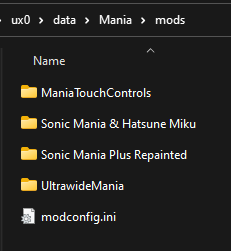
- Inside of each individual mod folder, look for
mod.ini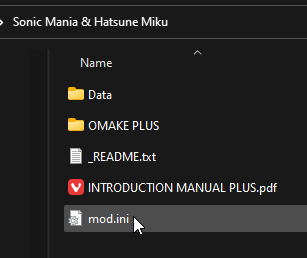
- Open
mod.iniand make sure the lineTargetVersion=5is in the file. If not, add it afterVersionlike so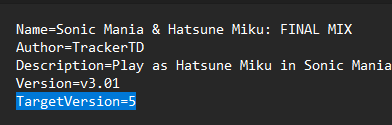
Enable the Mod Manager (Dev Menu)
RSDKv5-decomp has a built in devmenu that has a mod manager for you to quickly enable and disable your mods.
To enable it, simply add devMenu=y underneath the [Game] section in your Settings.ini.
If you don't have a Settings.ini, download it from below and place it in ux0:data/Mania.
To open the Dev Menu, tap the top left corner of your screen.
Now you can manage all of your mods!
Changes:
- Added Mod Support (duh)
- Added Multi-Threaded rendering of 2D scenes (Stable Menus and more stability in normal levels)
- Fixed: Metal Sonic Boss fight performance issues (Thanks smb123w64gb)
- Fixed: Not being able to grab onto tails
- Fixed: PS4 Data.rsdk couldn't load
- Fixed: Initial load time and load times across the board (Mods may change load time)
Known Issues:
- There are still various random and non-random crashes. I know some of them are caused by collision calculations since I found one on accident. I'm not an RSDKv5 guy so I'll simply report these to the main team.
- Special stages are still slow, but better than the last update. We're still looking at ways to optimize them further.
- Not really an issue, but this won't be released with Plus support. This is intentional as an anti-piracy measure, as there is
no real way to check for ownership. The only way to obtain Plus support is by building this yourself.
There is a guide here
WHO IS INTEGERGEORGE802?
HE'S JUST A DEV. PLEASE STOP ASKING ME D:
If you want to change the name, just add username=whatever_you_want under the [Game] section in Settings.ini
That is all for now. Enjoy
Sonic Mania Vita 1.0
Tag: 1.0 · 2022-08-16
Download: Settings.ini (0.0 MB)
Download: SonicMania.vpk (2.7 MB)
Sonic Mania PS Vita Port
LiveArea Assets by Danhanado
How to Install:
- Download and install the VPK
- Copy your Sonic Mania Data.rsdk file from your Steam, your PS4 or Switch Dumps to
ux0:data/Mania - Enjoy
Special Integer Scaling Mode:
Thanks to your friend Danhanado, I finally know what you were all talking about with the
Sonic 1, 2, and CD ports when you said scaling was horrible. Now I can't unsee it :)
We spent 4 and a half hours total trying to figure out the best way to impliment true integer scaling and came across this method with a bit of code change.
For forced Integer Scaling Mode (letterbox):
- Download the Settings.ini file from below and put it in your
ux0:data/Maniafolder. - Change the line
forceIntegerScaling=0toforceIntegerScaling=1 - Change the line
pixWidth=424topixWidth=480 - Change the line
maxPixWidth=424tomaxPixWidth=480
Known Issues:
- Special Stages are very lacking in performance. This is a renderer limitation and cannot be improved without more work from the upstream developers.
- Grabbing onto Tails results in Sonic instantly falling. This is an upstream issue. Any fix will be merged.
- ~~Game takes a while to start up, this is so everything else is snappy (No, your Vita is not frozen)~~
In the next update this will be removed, as this causes various random crashes. And I actually fixed something else that achieves similar load times - Stardust Speedway Bosses are slow. They're basically half 3D stages. No fix for this is considered possible at the moment.