Releases - FMVita
FileManager Vita v0.6.2
Tag: v0.6.2 · 2026-08-28
Download: Dark.png (0.1 MB)

Download: FileManager_v0.6.2.vpk (2.0 MB)
Download: Grid-1.png (0.1 MB)

Download: Grid-2.png (0.1 MB)

Download: Pink.png (0.1 MB)

FileManager Vita v0.6.2
This release focuses on stability, touch input and visual refinements.
Highlights
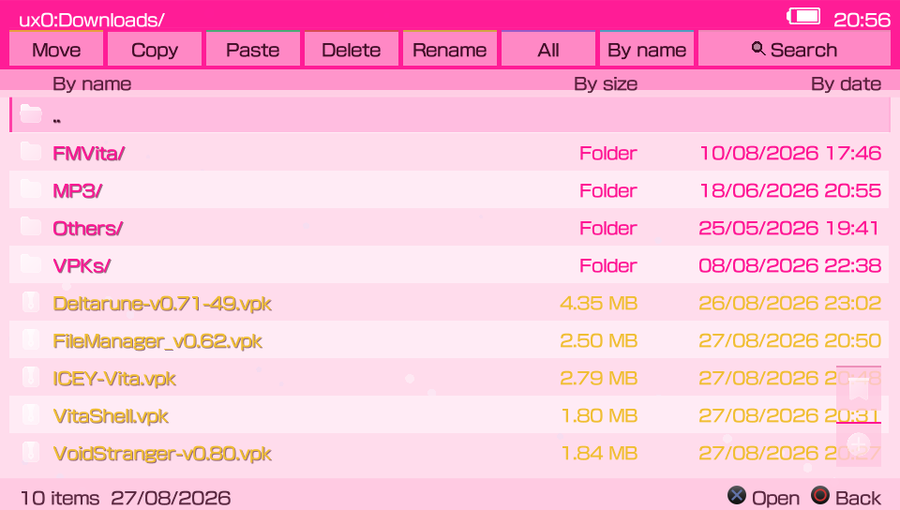
- Added two color themes: Dark, with a black and dark-gray palette, and Pink, with hot-pink and light tones.
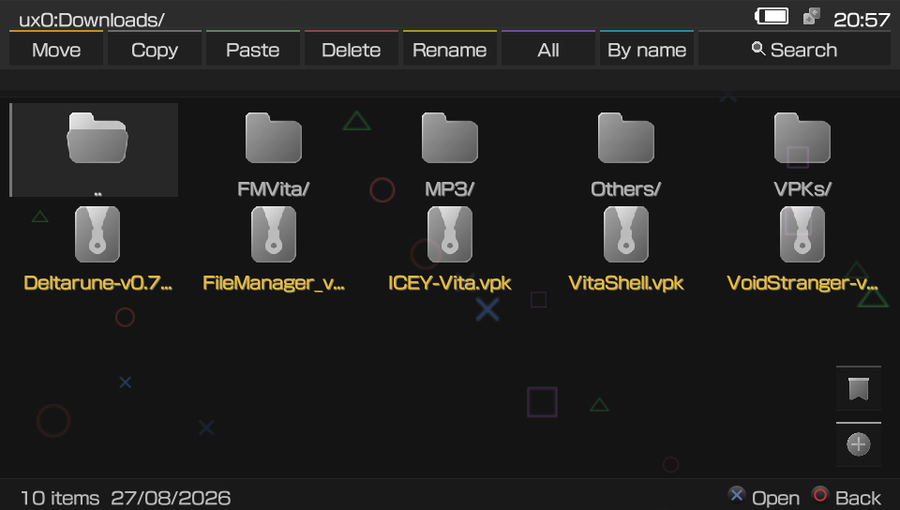
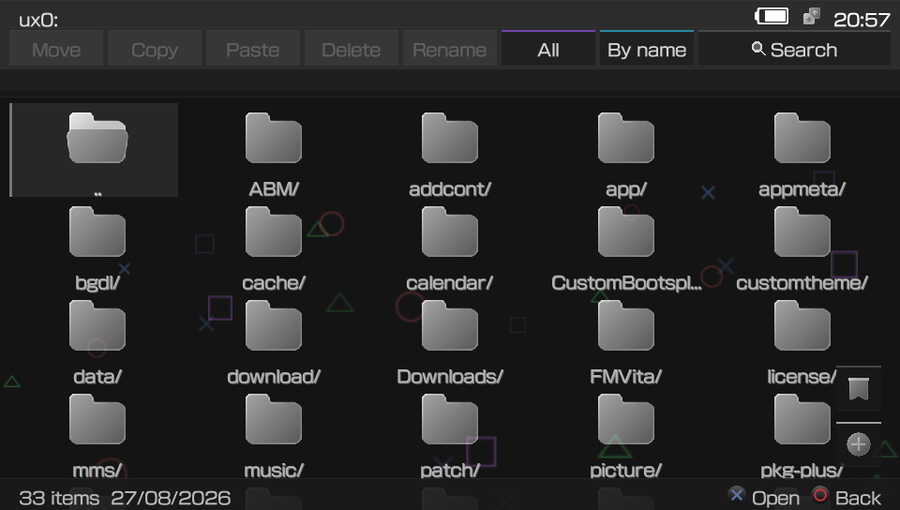
- Refined Grid view with the standard font size, centered file/folder names and width-aware ellipsis for long names.
- The dedicated Icons set is now always active and its redundant selector was removed from Settings.
- Added Wi-Fi and Bluetooth status icons. They are shown only when the corresponding connection/feature is active.
- Added touch input to controls that previously only displayed a button hint, including the OK button in file properties.
- Single-item copy, move and delete dialogs now show the selected file/folder name; multi-item actions retain the compact count summary.
Stability fixes
- Limited and periodically cleaned the Recent directory, removing stale entries to prevent excessive directory growth.
- Added a five-second directory-read safeguard that returns to the default root when a directory stalls.
- Fixed IME lifecycle and buffer handling issues that could crash rename/input operations.
- Hardened VPK installation and progress-thread synchronization to prevent stalls around extraction and promotion.
- Removed the GIF background from the VPK after identifying excessive decoded-frame memory use as a potential source of freezes during installation.
- Fixed invalid touch routing while modal dialogs are open and other crash-prone edge cases found in collected logs.
Installation
Copy FileManager_v0.6.2.vpk to your PS Vita and install it with VitaShell or another VPK installer. HENkaku/h-encore is required.
Screenshots
Dark and Pink themes
[image: Dark theme]
Adjusted Grid view
FileManager Vita v0.6.1
Tag: v0.6.1 · 2026-08-01
Download: FileManager_v0.6.1.vpk (2.5 MB)
Download: jpn-added.png (0.1 MB)

Download: JPN.png (0.1 MB)

Download: liquid-glass.png (0.1 MB)

Download: menu-lateral.png (0.1 MB)

Download: visual-liquid-glass.png (0.1 MB)

Download: vpk-info.png (0.1 MB)

New in v0.6.1
VPK installer GPU crash (opening the install dialog, worst in 3‑column view). The install preview used to build the whole archive node tree via archiveOpen(), which under memory pressure exhausted memory and took down the GPU. It now reads icon0.png / param.sfo directly, with no tree, and validates the texture before drawing it (skipped while already inside an archive).
archiveSetContext(vpk_path);              // set context, no tree built
ReadArchiveFile(icon_path, buf, 1<<20);   // read the single entry
if (w > 0 && w <= 1024 && h > 0 && h <= 1024) vpk_preview_icon = t; // else reject
Settings crash on open. A stale saved theme_preset could index past its options array (NULL string → data abort); it is now clamped to a valid range on load.
"Icons" theme. The icon set is now a proper theme (next to Default/Electron) instead of a color preset. The bookmark button uses the ribbon icon, bookmark entries use the fold icon; dedicated icons for .bak/.bin/.win/.psarc/.ark, MP3, download/Downloads, FTP and root. Confirmation buttons become translucent.
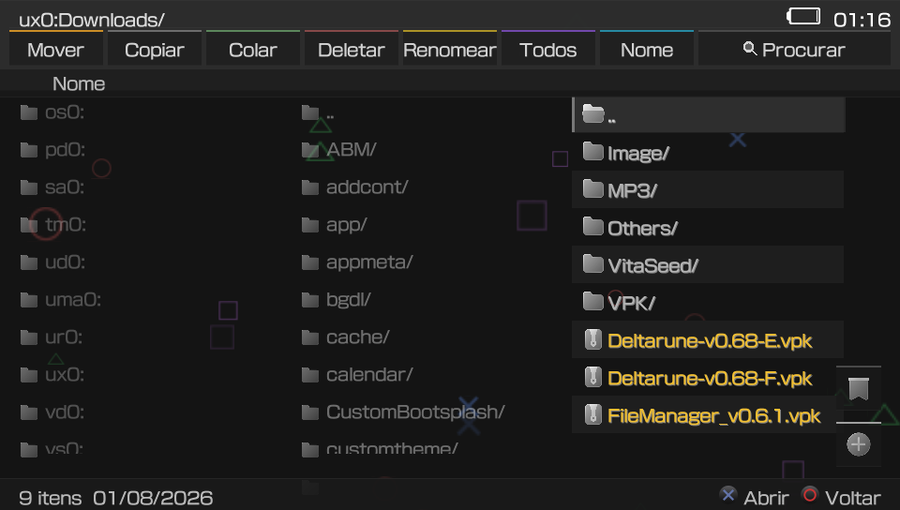
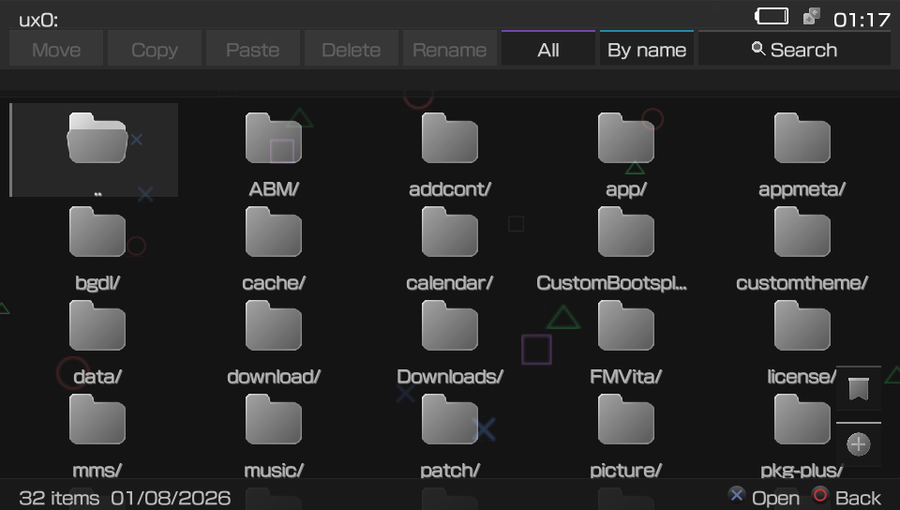
Interface. Confirmation modals now fade + slide in. FTP shows friendly status (Sending / Receiving / Deleting / Listing / Folder…) instead of raw protocol verbs (RETR, STOR, …). New animated backgrounds (Bubbles, Snow, Fireflies) and transitions (Vertical, Diagonal). LiveArea/XML bumped to 0.6.1.
Included from v0.6.0
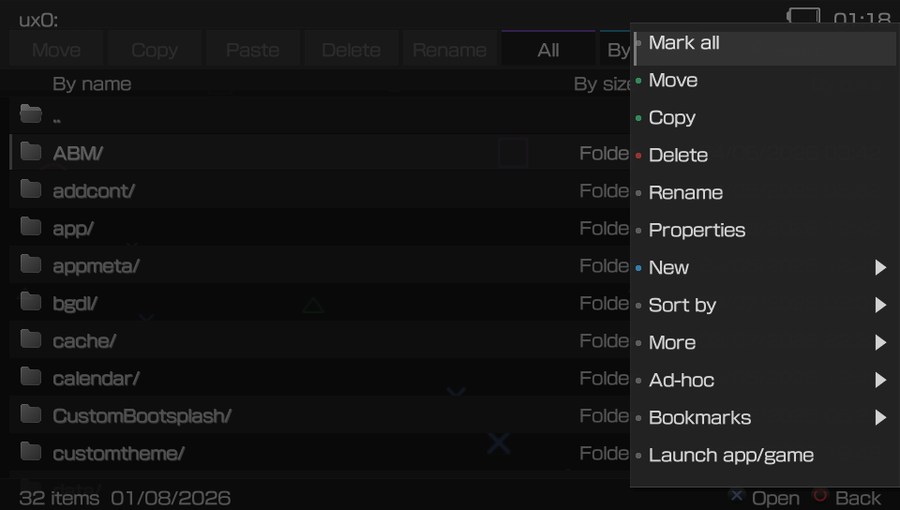
Context menu (triangle). Visible entries are packed contiguously; previously they were drawn at fixed .pos slots (0–14) with gaps from invisible entries, pushing options off‑screen.
Toolbar. New removed and Search made double‑width with a magnifier icon; the buttons fill the bar width and the +/bookmark touch areas match the drawing.
Sorting. Added By date (Sort menu and toolbar cycle), alongside By name / By size.
Text viewer scrolling. The cursor was bounded by MAX_POSITION (16) while only MAX_ENTRIES (10) rows are visible, so it detached from the lines. It is now bounded to the visible rows.
if ((s->rel_pos + 1) < MAX_ENTRIES) s->rel_pos++;   // was MAX_POSITION
else /* scroll base_pos */ ;
VPK install stuck at 99–100%. Switched from scePromoterUtilityPromotePkg() (no rif) to the canonical scePromoterUtilityPromotePkgWithRif(), force the bar to 100% before the long promote, and make PAF teardown best‑effort.
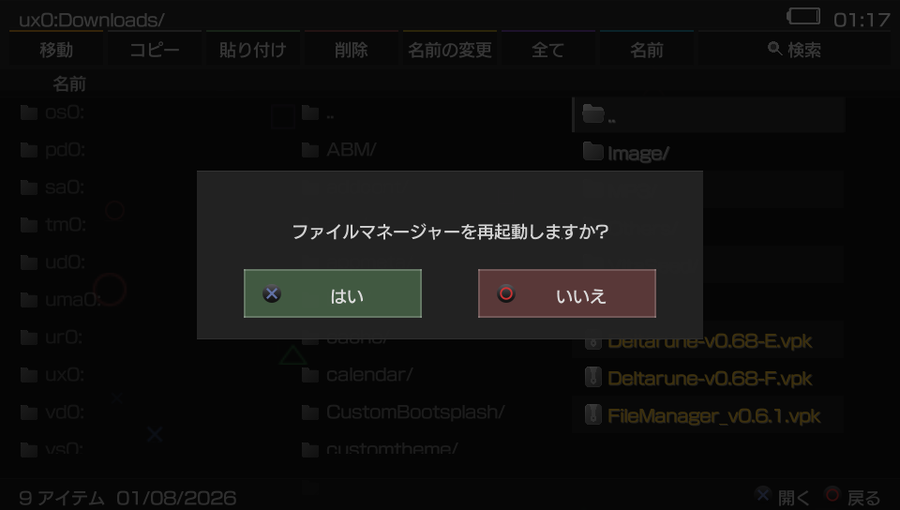
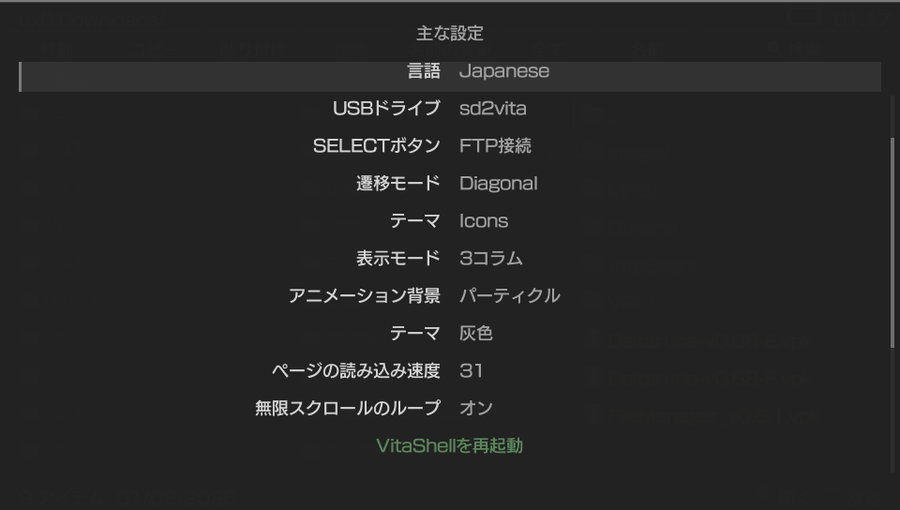
Language never switching. Reading app0:l10n/<lang>.txt at runtime failed (error 0x80010013); all 20 languages are now embedded in the binary and read from memory. The Japanese translation was contributed in #1.
readConfigBuffer(embedded_langs[i].buf, embedded_langs[i].size, entries, n);
Search. Matches text‑file contents (.txt/.ini/.log/.c/.h…), not just file names.
Column view. Icons are scaled (they were drawn at native size, huge) and the open folder is highlighted and kept in view.
Grid view. 4 rows × 5 columns with larger cells and high‑resolution icons (replacing the 20×20 blurry set); scrolls on the 5th row.
Install preview. The confirm dialog shows the icon, app name, Title ID and version read from the VPK's param.sfo.
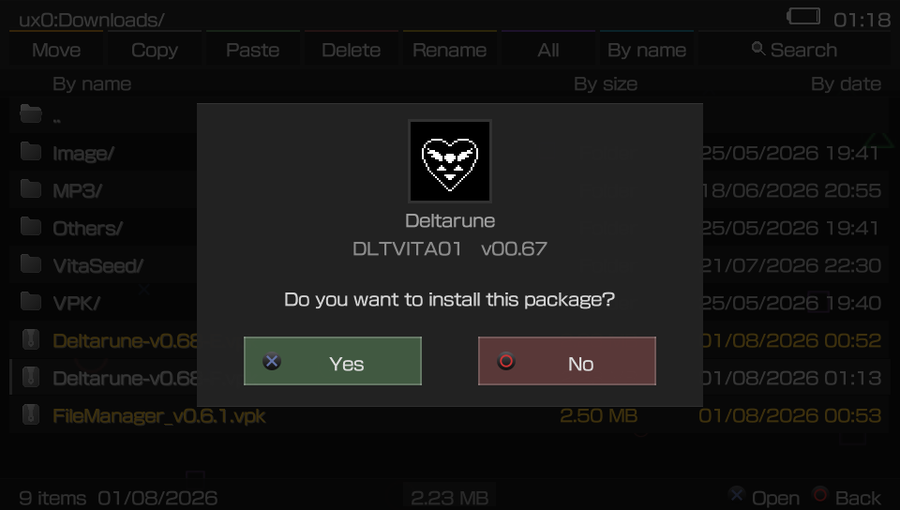
Install
Copy FileManager_v0.6.1.vpk to the Vita and install it with VitaShell (or another package manager). Requires HENkaku/h‑encore.
"Liquid Glass" icon set by Icons8.
FileManager Vita v0.6.0
Tag: v0.6.0 · 2026-07-31
Download: FileManager_v0.6.0.vpk (2.5 MB)
FileManager Vita v0.6.0
Fork do VitaShell. Principais mudanças.
Menu de contexto (triângulo). As opções visíveis passam a ser empacotadas de forma contígua; antes eram desenhadas em posições fixas (.pos 0–14) com lacunas de entradas invisíveis, o que jogava opções para fora da tela.
Toolbar. Removido o New e o Search ganhou largura dupla com ícone de lupa; os botões preenchem a largura da barra e as áreas de toque do +/bookmark passam a coincidir com o desenho.
Ordenação. Adicionado By date (menu Sort e ciclo do botão), além de By name / By size.
Editor de texto — scroll. O cursor era limitado por MAX_POSITION (16), mas só há MAX_ENTRIES (10) linhas visíveis, então ele descolava das linhas. Agora é limitado às linhas visíveis.
if ((s->rel_pos + 1) < MAX_ENTRIES) s->rel_pos++;   // antes: MAX_POSITION
else /* rola base_pos */ ;
Instalação de VPK travando em 99–100%. Troca de scePromoterUtilityPromotePkg() (sem rif) para o canônico scePromoterUtilityPromotePkgWithRif(), barra forçada a 100% antes do promote longo e teardown do PAF best‑effort.
Idioma nunca trocava. Ler app0:l10n/<lang>.txt em runtime falhava (erro 0x80010013); os 20 idiomas agora são compilados no binário e lidos da memória.
readConfigBuffer(embedded_langs[i].buf, embedded_langs[i].size, entries, n);
Busca. Passa a casar o conteúdo de arquivos de texto (.txt/.ini/.log/.c/.h…), não só o nome.
Modo colunas. Ícones escalados (antes ficavam no tamanho nativo, gigantes) e a pasta aberta é destacada e mantida à vista.
Modo grade. 4 linhas × 5 colunas, células/ícones maiores e ícones em alta resolução (no lugar dos 20×20 borrados); rola na 5ª linha.
Preview na instalação. O diálogo mostra ícone, nome do app, Title ID e versão lidos do param.sfo do VPK.
Instalação
Transfira FileManager_v0.6.0.vpk para o Vita e instale via VitaShell (ou outro gerenciador). Requer HENkaku/h‑encore.
Ícones "Liquid Glass" por Icons8.
FMVita v0.5.0
Tag: v0.5.0 · 2026-06-17
Download: FileManager.vpk (2.4 MB)
FMVita v0.5.0
Novidades / What's New
Layout e Navegação
- 2 Colunas — divisão 50/50: O modo de 2 colunas agora ocupa metade exata da tela para cada coluna, sem espaço vazio à direita.
- Clipping dinâmico de nomes: Os nomes de arquivos são recortados corretamente dentro de cada coluna nos modos 2 e 3 colunas.
- Painel Grandparent restrito ao modo 3 Colunas: Eliminado o painel de pasta avô no modo 2 Colunas.
- Hover de mouse preciso em modos coluna: O destaque de hover agora respeita os limites horizontais da coluna ativa.
Configurações e Idioma
- Troca de idioma reinicia só o FileManager: Ao mudar o idioma nas configurações, o app reinicia a si mesmo — sem reiniciar o console.
- Tema Personalizado (Custom): Novo preset de tema que lê cores de \ux0:FMVita/colors.txt.
Instalação de VPK
- Instalação em lote: Marque vários VPKs e instale todos em sequência de uma só vez.
Servidor FTP
- Verificação de Wi-Fi: Exibe modal de alerta se o Wi-Fi estiver desligado ao tentar iniciar o FTP.
- Mensagens de status melhoradas: Descrições legíveis das operações FTP em andamento.
- Progresso 0–100%: Acompanhe a transferência com barra de progresso.
- Atualização automática ao fechar FTP: A pasta atual é atualizada automaticamente ao encerrar o servidor FTP.
Background e Animações
- Validação de imagem de fundo: PNG/GIF devem ter resolução 960×540 e 8 bits — validado antes de carregar.
- Page Speed via D-PAD e Analógico: A velocidade configurável de rolagem agora se aplica a ambos os métodos de entrada.
- Correção de animações de transição: Slide e Fade corrigidos para evitar bugs visuais.
Installation / Instalação
Transfer \FileManager.vpk\ to your PS Vita via FTP or USB and install with any file manager.
Transfira \FileManager.vpk\ para o PS Vita via FTP ou USB e instale com qualquer gerenciador de arquivos.
v0.4.3
Tag: v0.4.3 · 2026-06-02
Download: FMVita0.4.3.vpk (1.7 MB)
v0.4.3 - QR download auto-install, touch-friendly QR dialogs, post-install launch, VPK context menu (Launch app/game), i18n updates, built-in videoplayer, button_fav/button_plus textures, build fix
FMVita v0.3.0
Tag: v0.3.0 · 2026-05-27
Download: FileManager.vpk (2.3 MB)
FMVita v0.3.0
v0.2.2 - Header overlay, status bar, GIF support, touch UX
Tag: v0.2.2 · 2026-05-26
Download: FileManager-v0.2.2.vpk (2.4 MB)
- Header row now drawn on top of file list (overlay): scrolled items no longer pass over headers
- HEADER_H increased from 22 to 26 for better readability
- Header text uses full theme text color (brighter)
- STATUSBAR_H increased from 28 to 34, background opacity 230, brighter text
- Fixed .GIF file selection freeze: FILE_TYPE_GIF added to file type system, routed to photo viewer
- Toolbar buttons: action fires on touch RELEASE (not press), with hover highlight animation
- Toolbar highlights fully colored when finger/mouse is over a button
v0.2.1 - Fix header/status bar layout
Tag: v0.2.1 · 2026-05-26
Download: FileManager-v0.2.1.vpk (2.4 MB)
- Header row labels moved up (ty=80) to prevent overlap with file list alternating strips
- File info text (size/date) now skips drawing when it would extend into the status bar (y >= 516)
FMVita v0.1.0
Tag: v0.1.0 · 2026-05-26
Download: FMVita-v0.1.0.vpk (3.2 MB)
FMVita v0.1.0
Primeira versão funcional do FMVita (File Manager Vita). Construído com base no VitaShell (por TheFloW), esta versão consolida diversas modificações de interface e usabilidade para aprimorar a gestão de arquivos no PS Vita.
Novas Funcionalidades
Personalização Visual * Temas Padrões: 6 novos presets de cores. * Background Animado: Suporte para 4 animações nativas, além de fundos customizados em formato GIF e PNG.
Navegação e Interface * Column View: Novo layout aprimorado com visualização em 3 colunas. * Interação por Toque: Suporte a Touch Dialogs e Swipe Gestures para uma navegação nativa e fluida na tela do console. * Controles Expandidos: Inclusão de Mouse Cursor e suporte a Drag-and-Drop (Arrastar e Soltar). * Quick Action Toolbar: Barra de ferramentas para acesso instantâneo às principais funções.
Gestão e Segurança de Arquivos * Busca e Filtro: Novo sistema de File Filter e Search para encontrar arquivos rapidamente. * Acesso Rápido: Botões de acesso rápido a Bookmarks (Favoritos) e Recent Files (Arquivos Recentes). * Undo System: Sistema de "Desfazer" para reverter ações com segurança.
Mudanças e Remoções
- Novo Diretório: Os dados do aplicativo foram movidos para o caminho
ux0:FMVita/. - Lixeira: Removida para simplificar a exclusão direta de arquivos.
- Recursos Descontinuados: O menu HENkaku Settings foram removidos para enxugar o código e otimizar a experiência principal.*